




- Trending
- Comments
- Latest
Security researchers have uncovered a paid Facebook advertising campaign that impersonates official Microsoft promotions to deliver malware capable of stealing cryptocurrency wallet data, browser passwords, and active login sessions from Windows users.
The operation uses Facebook ads to lure victims to cloned Windows 11 download pages, where a malicious installer silently steals saved passwords, browser sessions, and cryptocurrency wallet data. The Facebook Ad Malware campaign leverages trusted platforms, evasion techniques, and advertising analytics to maximize infections while avoiding detection.
The attackers’ strategy blends social engineering with technical precision. By disguising malware distribution as a routine Windows update, the Facebook Ad Malware operation capitalizes on user trust in both Microsoft branding and Facebook’s advertising ecosystem.
The Facebook Ad Malware attack begins with a paid Facebook advertisement that closely resembles a legitimate Microsoft promotion. The ads use official-looking branding and promote what appears to be the latest Windows 11 update. For users intending to keep their systems current, the ad presents a convenient shortcut.
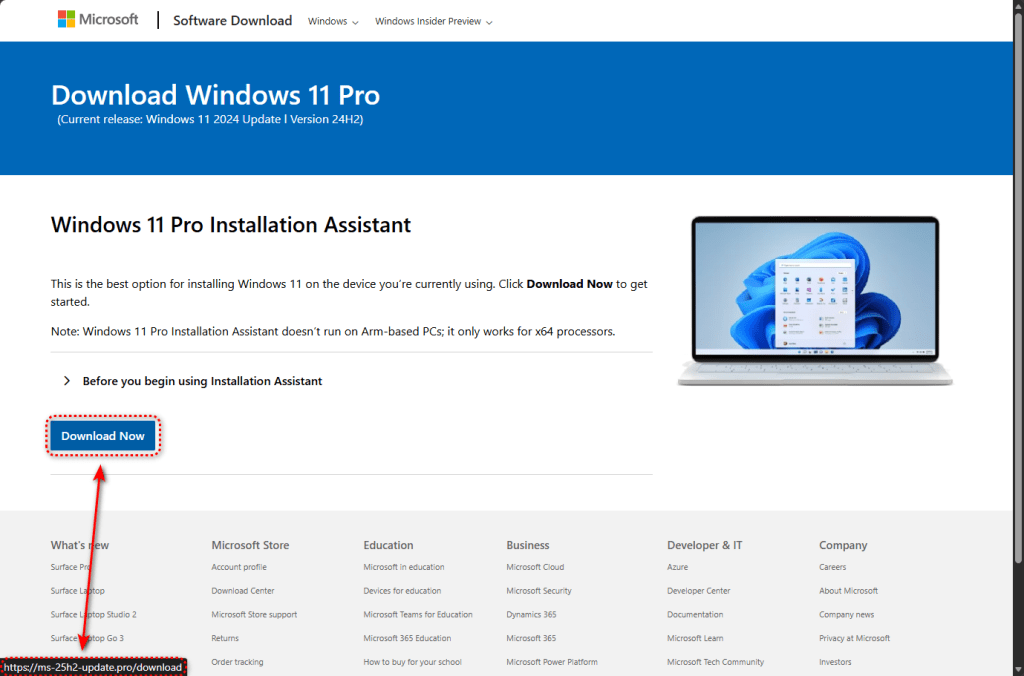
Clicking the advertisement redirects victims to a near-identical clone of Microsoft’s Software Download page. The design replicates Microsoft’s logo, layout, typography, and legal footer text. The only visible discrepancy appears in the URL. Instead of microsoft.com, users encounter lookalike domains such as:
The “25H2” naming convention mimics Microsoft’s Windows release cycle, such as version 24H2, making the domains appear plausible. Once on the site, users who click “Download now” are served a 75 MB executable file named ms-update32.exe.
The payload is hosted on GitHub, allowing the file to be delivered over HTTPS with a valid security certificate. Because it originates from a reputable domain, browsers do not automatically flag the download as suspicious. The installer itself is built using Inno Setup, a legitimate packaging tool frequently abused in malware distribution.
Unlike basic phishing operations, this Facebook Ad Malware campaign employs advanced evasion techniques. Before delivering the malicious file, the cloned page performs geofencing and sandbox detection checks. Visitors connecting from data center IP addresses—commonly used by security researchers—are redirected to google.com, masking the campaign from automated analysis systems.
Only users appearing to access the site from residential or corporate networks receive the malware. This selective targeting has enabled the Facebook Ad Malware infrastructure to evade detection for longer periods.
When a targeted user clicks “Download now,” the site triggers a Facebook Pixel “Lead” event, a legitimate advertising analytics tool. This indicates that attackers are tracking conversions and optimizing their ad spend in real time—mirroring standard digital marketing practices.
Once executed, the installer checks for virtual machines, debugger tools, and analysis environments. If detected, the program halts. On legitimate systems, it proceeds to deploy its components.
A key component installs an Electron-based application in:
C:\Users<USER>\AppData\Roaming\LunarApplication\
Electron is widely used by trusted applications such as Slack and Visual Studio Code, making it an effective disguise. The application bundles Node.js libraries capable of creating ZIP archives, suggesting harvested data is collected and packaged before exfiltration. Likely targets include cryptocurrency wallet files, seed phrases, browser credential stores, and active session cookies.
The Facebook Ad Malware demonstrates advanced persistence techniques. It writes a large binary value to the Windows registry under:
HKEY_LOCAL_MACHINE\SYSTEM\Software\Microsoft\TIP\AggregateResults
The TIP (Text Input Processor) path is a legitimate Windows component, reducing suspicion. In addition, the malware writes obfuscated PowerShell scripts with randomized filenames into the %TEMP% directory and executes them using a command that disables script-signing protections.
The command includes:
powershell.exe -ExecutionPolicy Unrestricted
This approach allows malicious scripts to execute without typical security enforcement.
Telemetry further indicates process injection behavior. The malware creates legitimate Windows processes in a suspended state, injects malicious code, and resumes execution—enabling it to operate under the identity of trusted system processes. Temporary files are deleted after execution, and system reboots may be triggered to hinder forensic analysis.
Encryption and obfuscation techniques—including RC4, HC-128, XOR encoding, and FNV hashing—complicate static analysis, reinforcing the sophistication of the Facebook Ad Malware infrastructure.
The use of paid social media advertising distinguishes this Facebook Ad Malware operation from traditional phishing emails. Rather than hiding in spam folders or malicious search results, the campaign appears alongside posts from friends and family, increasing its perceived legitimacy.
Researchers observed two parallel ad campaigns, each directing traffic to separate phishing domains. Each campaign operated with its own Facebook Pixel ID and tracking parameters. This redundancy ensures continuity if one domain or advertising account is disabled.
Security experts emphasize that Windows updates are distributed through the built-in Windows Update system—not through websites or social media advertisements. Microsoft does not promote Windows updates via Facebook ads.
SHA-256 File Hash:
c634838f255e0a691f8be3eab45f2015f7f3572fba2124142cf9fe1d227416aa
Domains:
ms-25h2-download[.]pro
ms-25h2-update[.]pro
ms25h2-download[.]pro
ms25h2-update[.]pro
Payload Delivery URL:
raw.githubusercontent.com/preconfigured/dl/refs/heads/main/ms-update32.exe
File System Artifacts:
C:\Users<USER>\AppData\Roaming\LunarApplication\
C:\Users<USER>\AppData\Local\Temp[random].yiz.ps1
C:\Users<USER>\AppData\Local\Temp[random].unx.ps1
Registry Path:
HKEY_LOCAL_MACHINE\SYSTEM\Software\Microsoft\TIP\AggregateResults
Users who downloaded or executed files from the listed domains should treat their systems as compromised. Recommended actions include running a full security scan, changing passwords from a clean device, and transferring cryptocurrency funds to newly generated wallets created on secure systems.
For enterprise environments, security teams are advised to block the identified domains at DNS and web proxy layers, monitor PowerShell executions using unrestricted policies, and search for the LunarApplication directory.



Copyright © 2025 - The Bit Gazette.